February 1993 gearcase bulletin describing shift cable adjustment for OMC jet outboards, with five numbered factory illustrations.

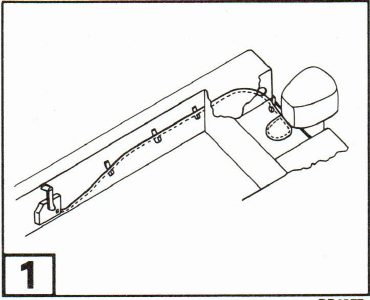
1Control Cables: Replace cables that are too long or kinked. Make sure the cables are routed correctly and adequately supported. Many shifting problems can be eliminated by using OMC control cables.
Note The following adjustment procedure replaces all previous instructions.
⚠ Correct shift cable adjustment will help prevent water pressure from the forward motion of the boat forcing the reverse gate out of the FORWARD position into REVERSE, causing the boat to stop abruptly. Occupants could be thrown about or ejected.
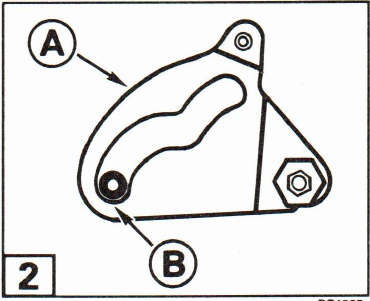
2Pull up on shift cam Ⓐ until cam roller is at the far end of the FORWARD detent range Ⓑ.
3Shift remote control to FORWARD position. Temporarily push cable guide Ⓒ onto shift cam stud Ⓓ. Pull firmly on cable casing to remove free-play. Adjust cable trunnion to align with trunnion anchor bracket Ⓔ. Pull cable off stud.
(Continued)
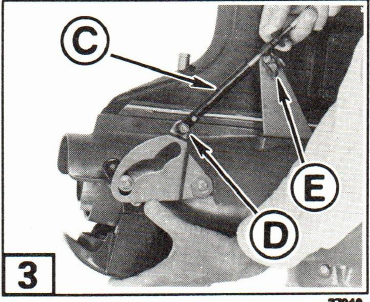
Insert cable trunnion in anchor bracket and turn 90° to lock trunnion in place.
Push cable guide onto stud. Install washer and hand tighten locknut.
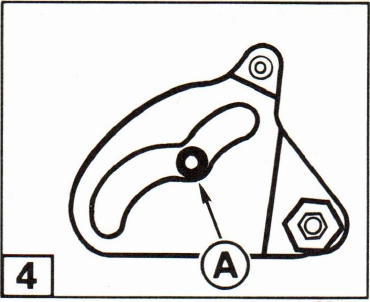
4Shift remote control to NEUTRAL. The cam roller should snap into NEUTRAL detent Ⓐ when you pull up on the reverse gate with moderate pressure.
If you cannot achieve NEUTRAL detent, lengthen cable slightly and recheck your adjustment.
Important It is very important that the reverse gate remains locked in the FORWARD detent range when remote control is in FORWARD. When properly adjusted, the reverse gate can not be pulled out of the FORWARD detent range by hand.
Tighten locknut and loosen ⅛ to ¼ turn to permit free movement of cam.
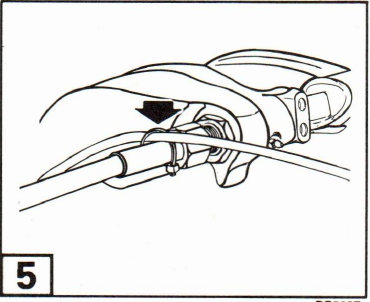
5Loosely secure shift cable to the steering cable with a tie strap. DO NOT restrict movement of the shift cable.